

Topping Up Your Own PAMM Account
As a PAMM manager you can deposit your own USDT into the PAMM you run — useful for seeding the strategy, increasing skin in the game, or topping up margin alongside member capital. The deposit moves funds from one of your other personal accounts straight into the PAMM's wallet.
Prerequisites
- A PAMM account you manage (create one if you don't have it yet)
- At least one other personal account (Spot or Futures) with a non-zero USDT balance — that's the only currency PAMM accepts
- 2FA enabled — required to confirm the deposit
Where to Find the Deposit Button
You can open the deposit dialog from three places once you're inside your PAMM account:
- Account header card — next to the Edit / View buttons, click Deposit
- Left sidebar — the Deposit entry at the bottom of the PAMM menu
- Mobile menu — the Deposit item in the bottom-sheet menu on phones
All three open the same dialog.
Step 1: Choose the Source Account
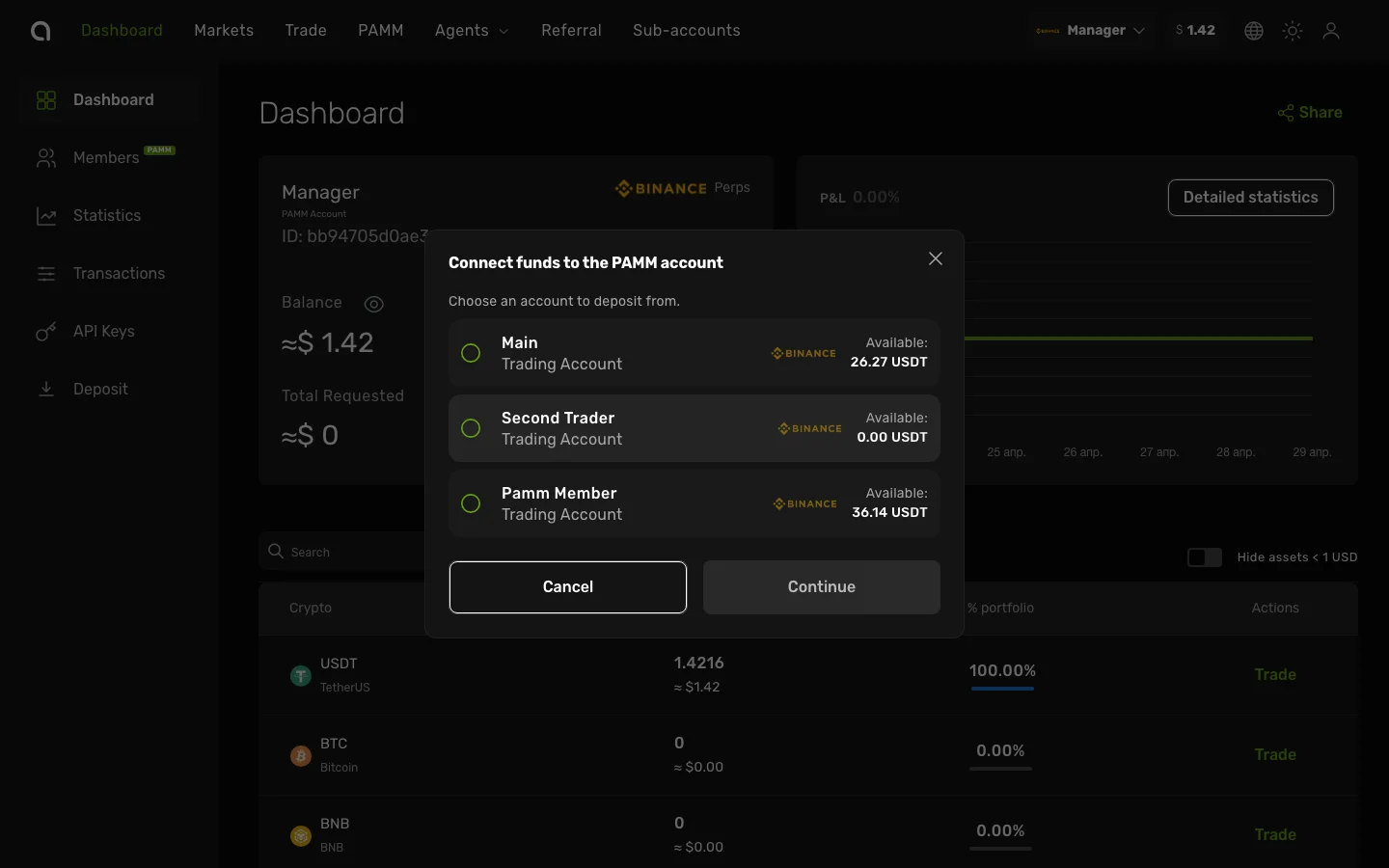
The dialog lists every personal account you have that's eligible to fund the PAMM:
- Manager (PAMM) accounts are excluded — you can't fund a PAMM from another PAMM
- The current PAMM (where you are right now) is also excluded
- Each row shows the account name, type, exchange, and the USDT wallet balance — not the total USD value across coins
Pick the account you want to fund from and click Continue.
Step 2: Enter the Amount
The amount step shows the PAMM's terms (min/max deposit, vesting period) and your USDT balance on the chosen source account. Enter how much USDT you want to move into the PAMM, or click All to use the full balance.
Validation enforces:
- Minimum deposit — set in your PAMM's management settings
- Maximum deposit — also from PAMM settings
- Available balance — you can't deposit more USDT than the source account holds
Click Continue to proceed.
Step 3: 2FA Confirmation
Enter the 6-digit code from your Google Authenticator app and click Confirm.
After the Deposit
Once confirmed:
- The USDT is moved from your source account into the PAMM's wallet
- The PAMM AUM (Assets Under Management) and My PAMM Balance update on your dashboard
- A success dialog confirms the transferred amount; closing it refreshes the page so balances reflect the new state
The deposit appears in your PAMM's transaction history and is treated like any other capital under management — vesting, commission, and statistics rules apply to it the same way as to member deposits.
Notes
- USDT only — PAMM does not accept other assets. If the source account's USDT balance is zero, the Continue button stays disabled even if the wallet shows a non-zero total in other coins.
- Member-style deposit — your own deposit is bookkept the same way as a member's connected funds, including the vesting period you configured.
- Withdrawing your own funds — to pull your own capital back out, use the standard withdrawal request flow.