

Take-Profit & Stop-Loss (TP/SL)
Take-Profit (TP) and Stop-Loss (SL) are essential risk management tools. TP automatically closes your position at a profit target, while SL closes it at a defined loss level to limit downside.
Setting TP/SL When Placing an Order
- Fill in your order details (market, limit, or stop order)
- Click the TP/SL toggle or Advanced button in the order form
- Set your Take-Profit price or percentage
- Set your Stop-Loss price or percentage
- Place the order — TP/SL will be attached to the resulting position
Advanced TP/SL — Multiple Levels
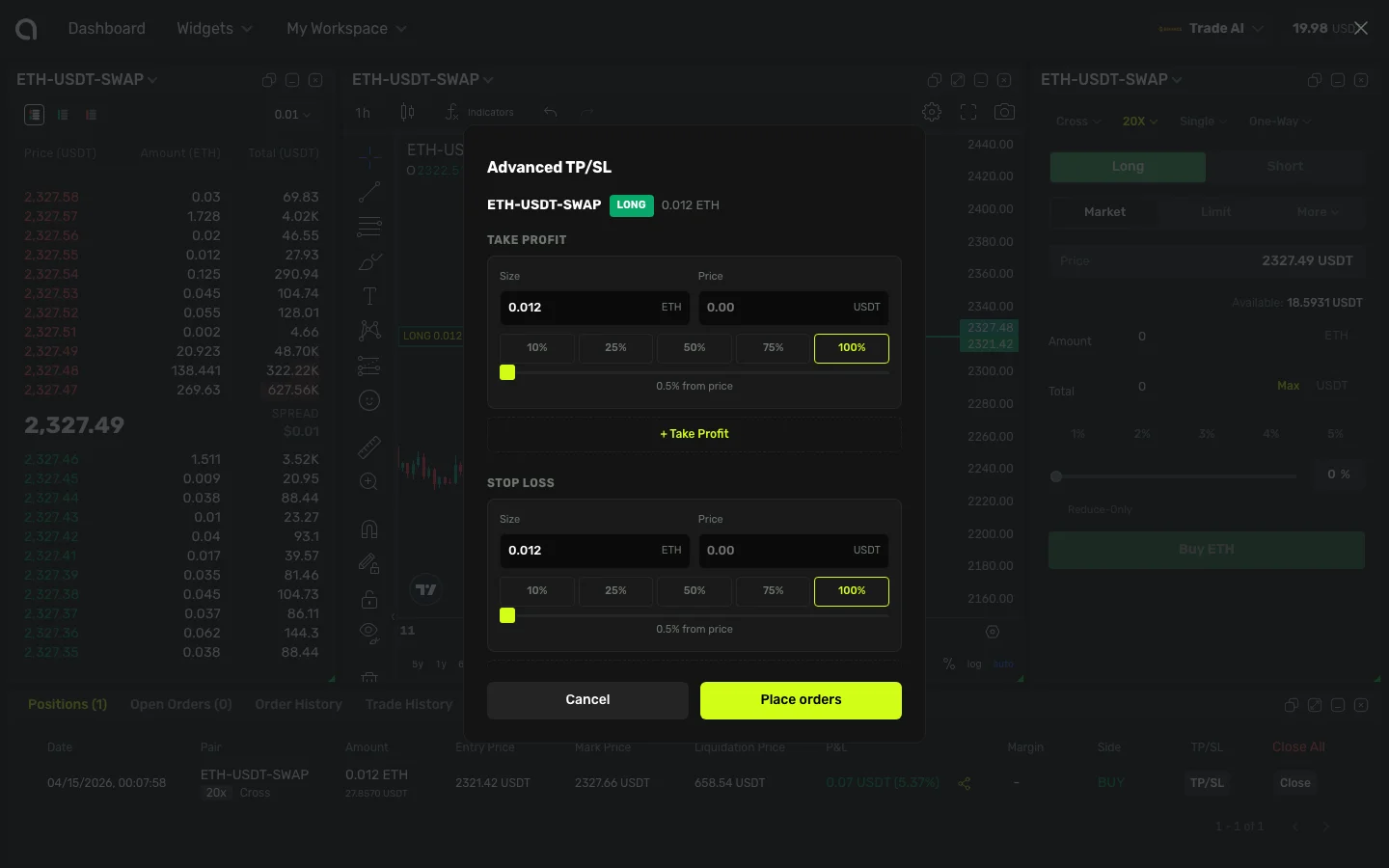
Amabit supports multiple Take-Profit and Stop-Loss targets per position. This allows you to take partial profits at different price levels, or set graduated stop-losses to manage risk progressively.
How to Open the Advanced TP/SL Dialog
- Open the Trading Terminal and go to the Positions tab at the bottom
- Find the position you want to manage
- Click the TP/SL button next to that position
- The Advanced TP/SL dialog opens, showing your symbol, position side (LONG/SHORT badge), and quantity
Take Profit Section
In the top half of the dialog, you configure your take-profit targets:
- Size — How much of your position to close at this level (enter a number or use the percentage buttons: 10%, 25%, 50%, 75%, 100%)
- Price — The target price at which to take profit. You can:
- Enter an exact price manually
- Use the slider to set a percentage offset from the current price (0.5% to 5%)
- The price is calculated automatically from the slider position
- Click + Take Profit to add more levels — each level closes a portion of your position at a different price
Stop Loss Section
The bottom half works identically to Take Profit, but in the opposite direction:
- Size — Portion of your position to close
- Price — The price at which to cut your loss (slider goes 0.5% to 5% below entry)
- Click + Stop Loss to add more levels
Summary and Placement
At the bottom of the dialog, a summary shows the total TP quantity, SL quantity, and your full position size. When ready, click the green Place orders button to submit all TP/SL orders at once.
TIP
The total quantity across all TP targets cannot exceed your position size. Same applies to SL targets. The dialog validates this automatically.
Example — 3-Level Take-Profit:
| Level | Profit % | Close % | Meaning |
|---|---|---|---|
| TP 1 | +2% | 30% | Close 30% of position at 2% profit |
| TP 2 | +5% | 40% | Close another 40% at 5% profit |
| TP 3 | +10% | 30% | Close remaining 30% at 10% profit |
Adding TP/SL to Existing Positions
You can add or modify TP/SL on positions that are already open:
- Go to the Positions tab in the terminal
- Click the TP/SL button next to the position
- Configure your targets
- Confirm
How TP/SL Orders Execute
All TP/SL orders on Amabit are placed as trigger market orders (stop-market). When the price reaches your target, the order executes immediately at the current market price. This guarantees execution — your TP or SL will always fill, even in fast-moving markets.
INFO
There may be minor slippage between your trigger price and the actual execution price, especially during high volatility. This is normal for market orders and is the trade-off for guaranteed execution.
Trailing Stop
Amabit also supports trailing stop functionality through webhook signals. A trailing stop follows the price and triggers when the market reverses by a specified callback rate.
Learn about trailing stops in signals →
Tips for Using TP/SL
- Always use a stop-loss — It protects your capital from unexpected market moves
- Use multiple TP levels — Lock in partial profits while letting the rest run
- Risk-reward ratio — Aim for TP targets that are at least 2x your SL distance
- Adjust after entry — Markets change; don't hesitate to modify your TP/SL