

Creating a PAMM Account
A PAMM account lets you manage other users' capital and earn commissions on profits. This guide walks you through the full creation process step by step.
Prerequisites
- Verified Amabit account (KYC completed)
- 2FA enabled — required for account creation
- Trading experience — you'll be managing real capital
Step 1: Choose Account Type
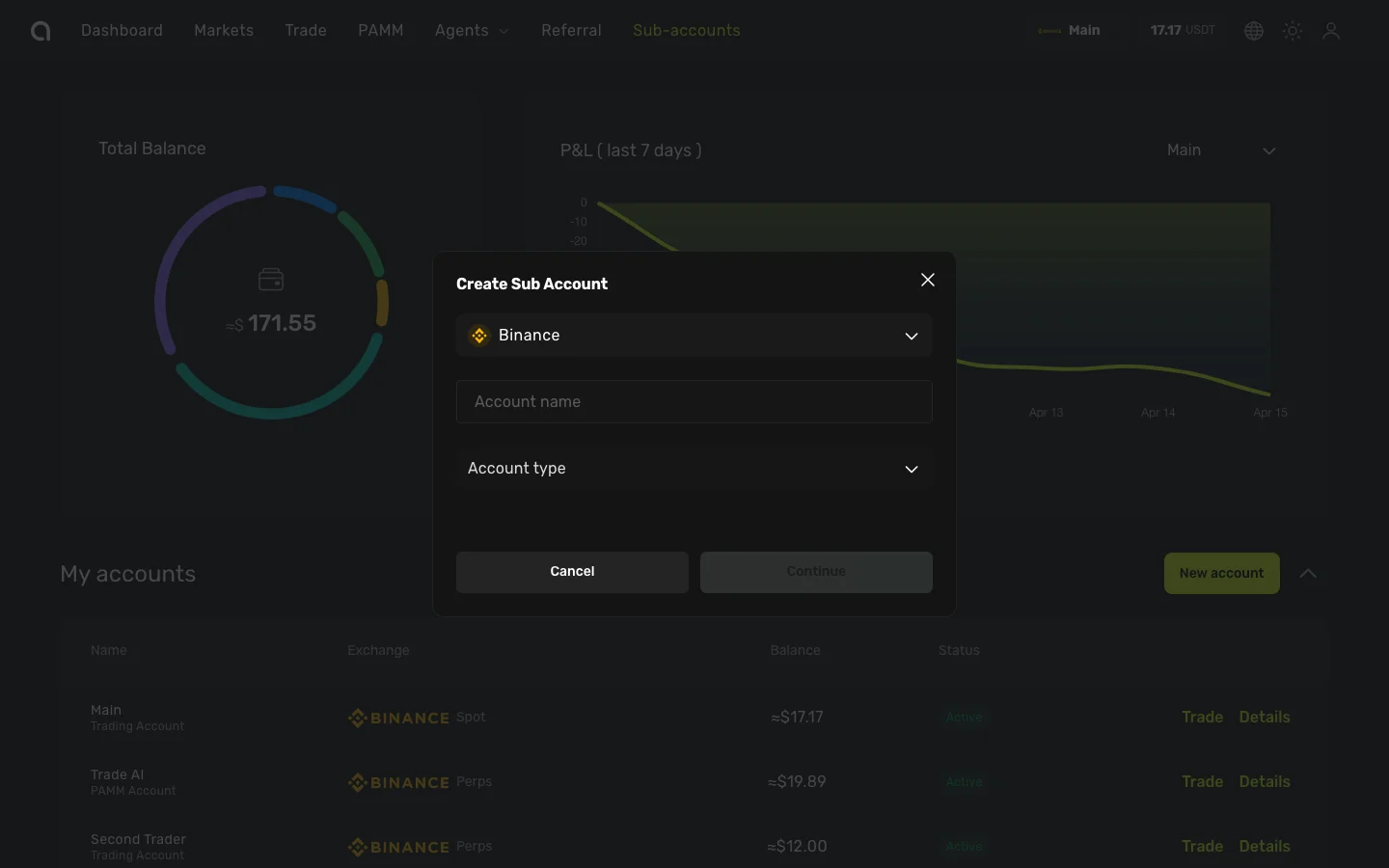
- Go to the Sub-accounts page and click New account
- In the Create Sub Account dialog:
- Select the Exchange (Binance)
- Enter an Account name (e.g., "My PAMM Fund")
- Open the Account type dropdown and select PAMM Account
- Choose Trading type (Spot or Futures)
- Check I agree to create a PAMM account
- Click Continue
Step 2: General Settings
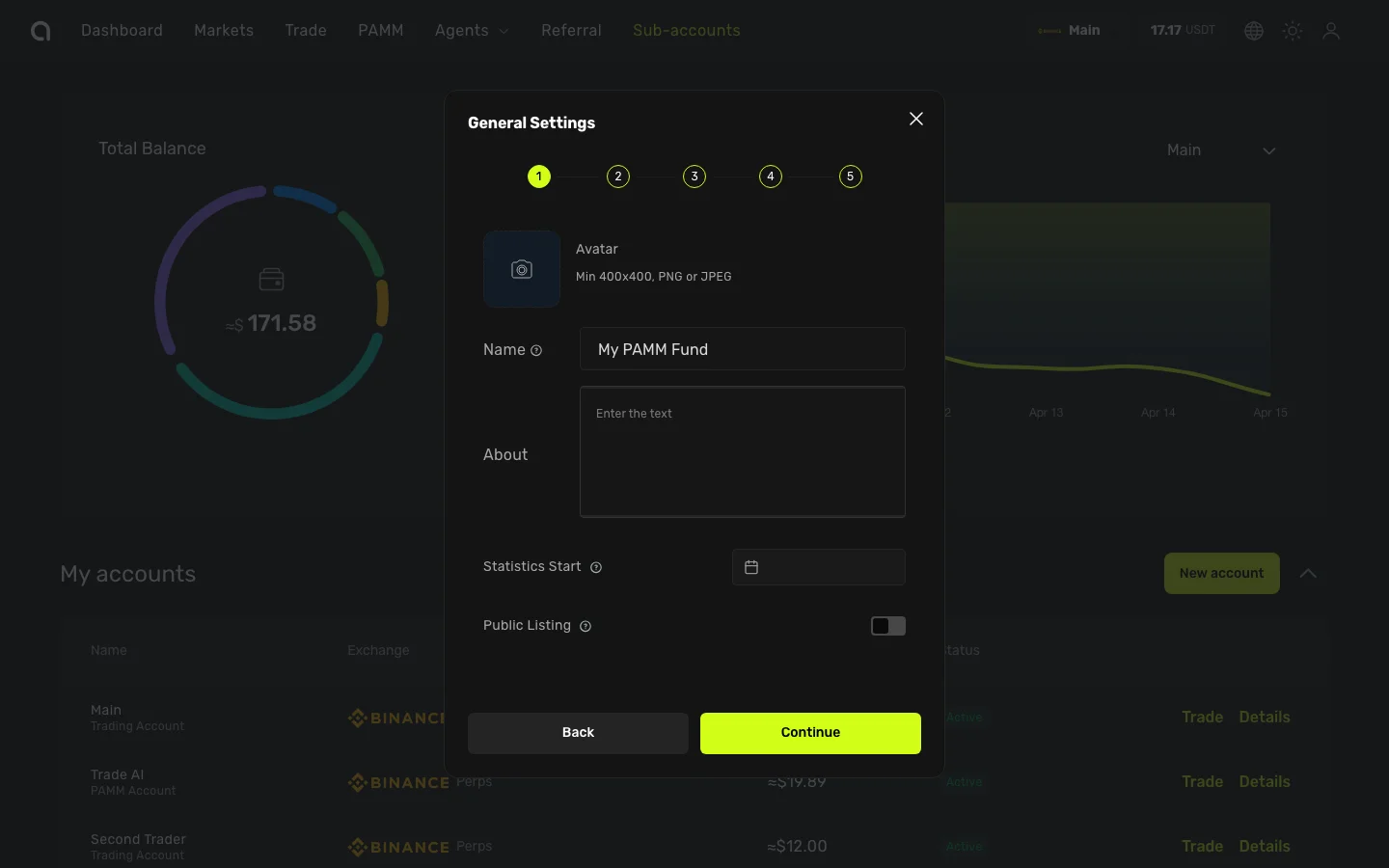
A 5-step settings wizard opens. The first step configures your PAMM profile:
The first step of the settings wizard configures your PAMM profile:
| Setting | Description |
|---|---|
| Avatar | Upload a profile image for your PAMM (visible in the marketplace) |
| Account name | The name displayed to potential members |
| About | A description of your trading strategy and experience |
| Statistics start date | The date from which your performance statistics are calculated |
| Is Public | Toggle whether your PAMM is visible in the public marketplace |
Click Continue to proceed.
Step 3: Management Settings
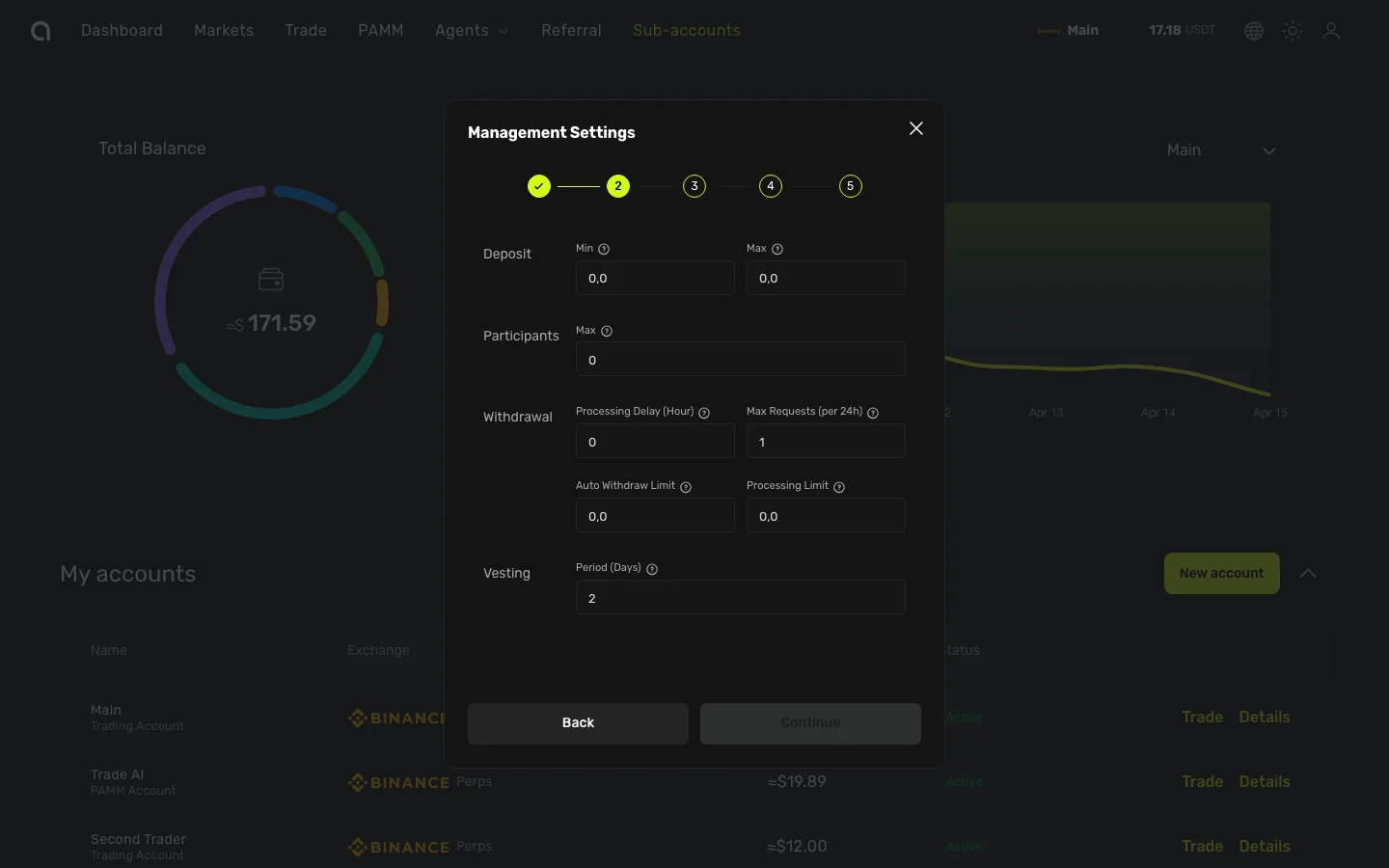
Configure the terms for your PAMM members:
| Setting | Description |
|---|---|
| Minimum deposit | The smallest amount a member can connect (in USDT) |
| Maximum deposit | The largest amount per member |
| Maximum members | Total number of members your PAMM can accept |
| Vesting period | Lock-up period in days — members cannot withdraw during this time after connecting |
Click Continue to proceed.
Step 4: Fee Configuration
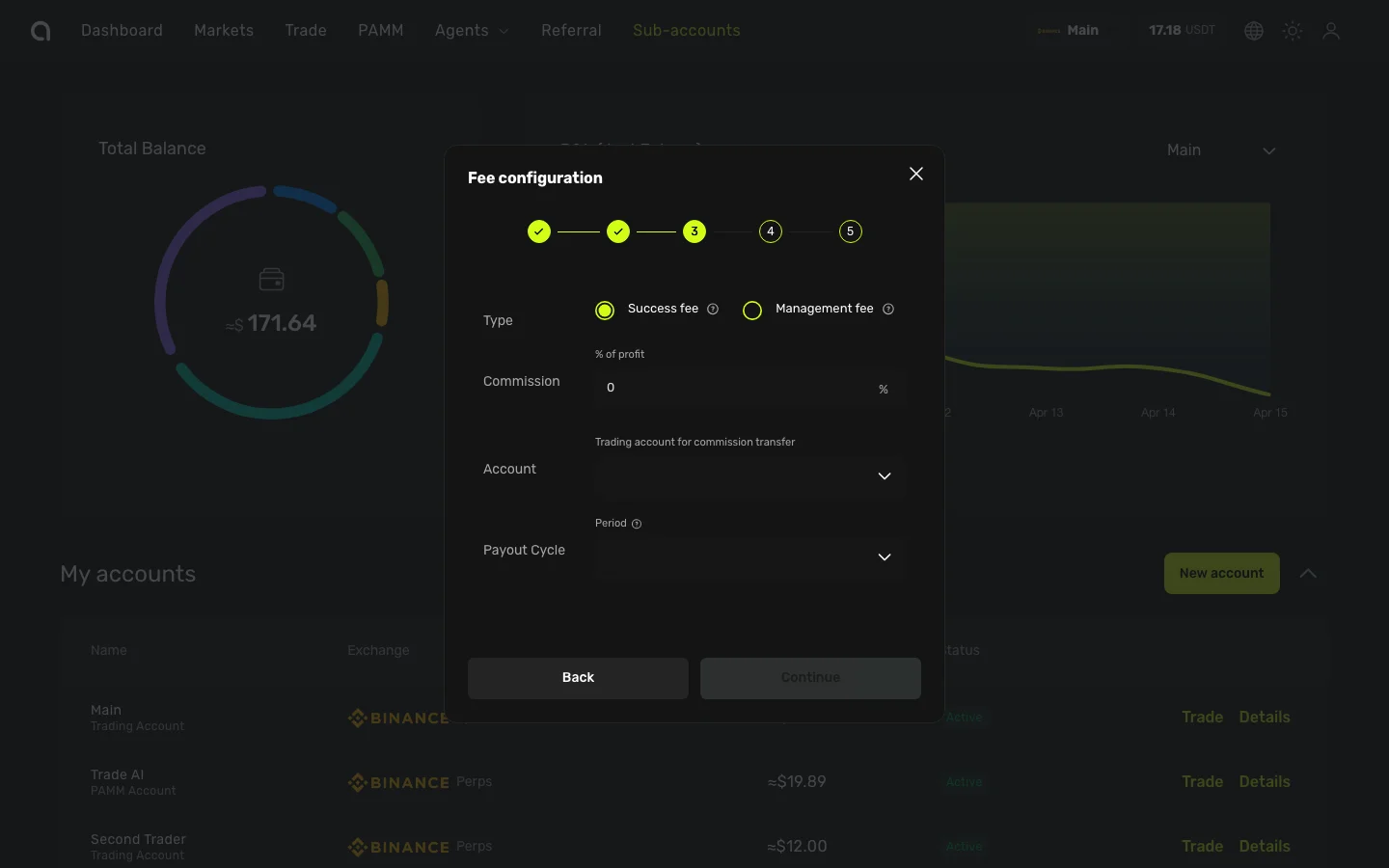
Set how you earn from managing capital:
| Setting | Description |
|---|---|
| Commission type | Choose between Success Fee or Management Fee (see details below) |
| Commission percentage | Your fee rate — depends on commission type |
| Account for payments | Your Spot trading account on the same exchange that receives commission payouts |
| Billing cycle | How often commissions are settled and paid out |
Commission Types
Success Fee — charged on net profits only (0–50%)
- Calculated based on each member's profit (PnL)
- Uses a high watermark: you only earn fees on new profits above the previous peak
- If a member's position is at a loss, no fee is charged
- Accrued continuously and settled once per billing cycle
- Example: 20% Success Fee, member earns 1,000 USDT profit → you receive 200 USDT
Management Fee — charged on total managed capital (0–2% monthly)
- The rate you set is a monthly rate, applied daily based on Net Asset Value (NAV)
- Calculated and settled once per billing cycle
- Does not depend on profit — charged regardless of performance
- Example: 1% monthly Management Fee on 100,000 USDT NAV → ~1,000 USDT per month
Billing Cycle Options
| Cycle | Settlement frequency |
|---|---|
| Daily | Every day |
| Weekly | Every Sunday |
| Bi-weekly | Every other Sunday |
| Monthly | Last day of each month |
All settlements occur automatically at 00:05 UTC on the designated billing day.
Click Continue to proceed.
Step 5: Affiliate Program
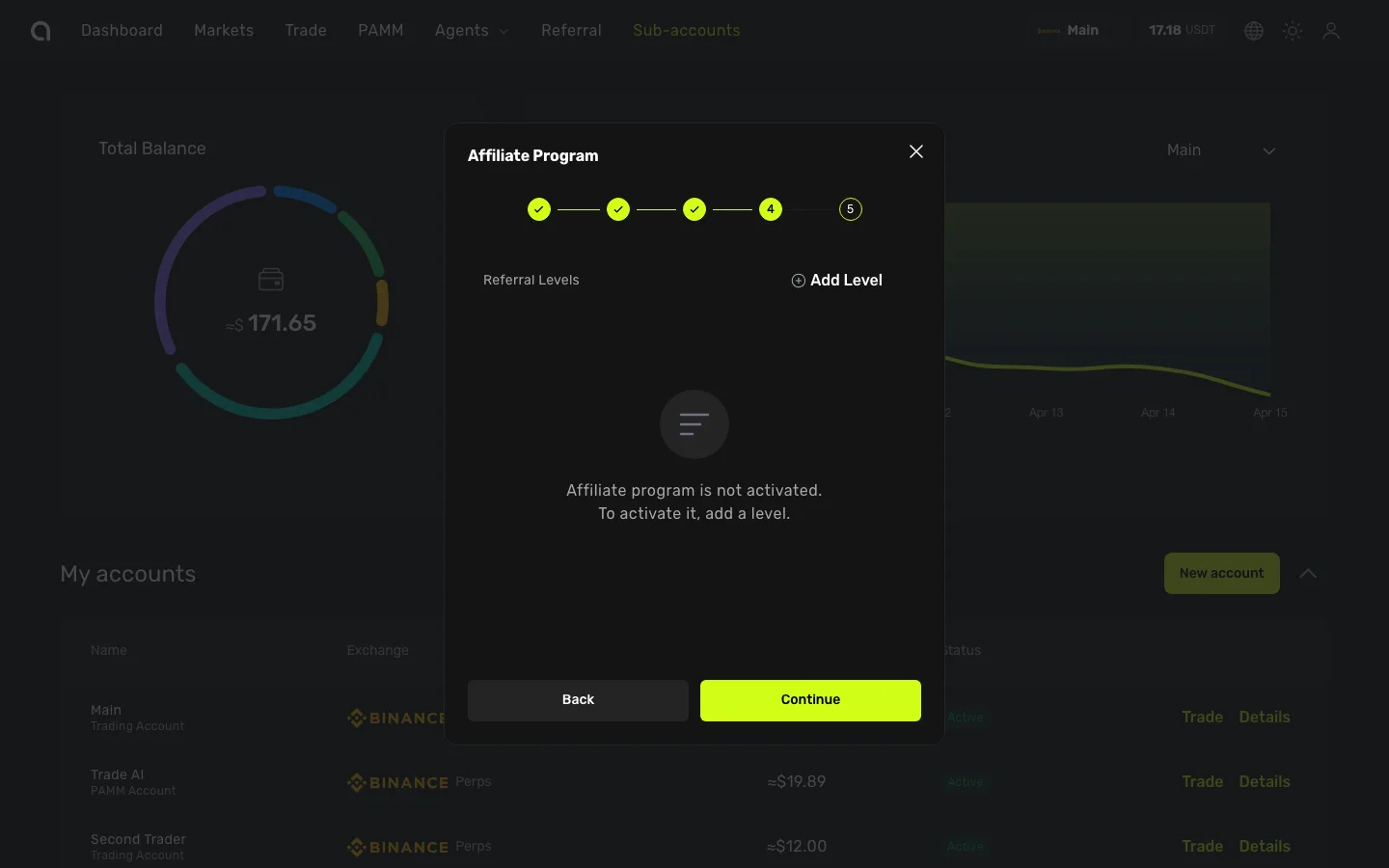
Configure your PAMM's affiliate/referral program. This lets members who bring in new participants earn a share of your commission.
How It Works
- A member shares their referral link for your PAMM
- New users connect funds to your PAMM through that link
- When you charge a commission (Success Fee or Management Fee), a portion is automatically distributed to referral partners based on their level
The referral commission is taken from the manager's commission, not from member returns. For example, if you charge a 20% Success Fee and a member earns 1,000 USDT profit:
- Your total commission = 200 USDT
- Level 1 referrer receives: 200 × 10% = 20 USDT
- Level 2 referrer receives: 200 × 5% = 10 USDT
- You keep: 200 − 20 − 10 = 170 USDT
Configuring Levels
Click Add Level to create referral tiers. Each level has:
| Setting | Description |
|---|---|
| Level | Referral depth (1–9). Level 1 = direct referrer, Level 2 = referrer of the referrer, etc. |
| Percentage | Share of your commission paid to the referrer at this level (0–100%) |
Rules:
- Up to 9 levels can be configured
- The sum of all level percentages cannot exceed 100%
- Each percentage must be between 0% and 100%
Example: 3-Level Referral Program
| Level | Percentage | Who receives |
|---|---|---|
| 1 | 10% | The person who directly referred the member |
| 2 | 5% | The person who referred the Level 1 referrer |
| 3 | 2% | The person who referred the Level 2 referrer |
With a Success Fee commission type, the percentage is a share of the profit-based commission. With a Management Fee, it's a share of the AUM-based fee.
If you don't need an affiliate program, leave it empty and click Continue.
Step 6: Statistics Configuration
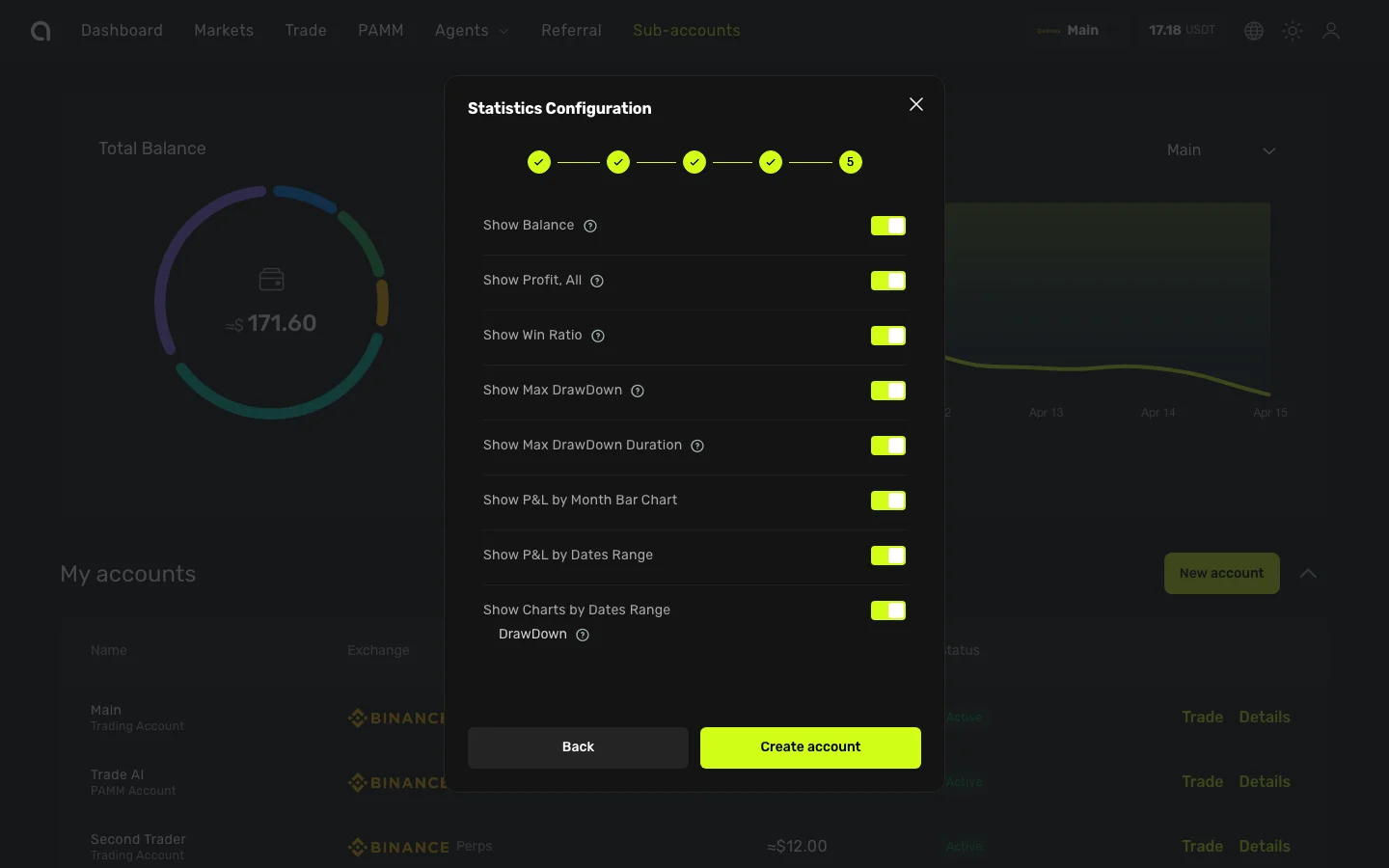
Choose which performance metrics are visible to potential members on your public PAMM page:
- Show Balance — Assets Under Management (AUM)
- Show Profit, All — Total PnL
- Show Win Ratio
- Show Max Drawdown
- Show Max Drawdown Duration
- Show PnL by Month Bar Chart
- Show PnL by Dates Range
- Show Charts by Dates Range
- Dashboard — Show account dashboard info
Click Create account to proceed to the final verification step.
Step 7: Email Verification
As a final security step:
- A verification code is sent to your registered email
- Enter the 6-digit code from the email
- If 2FA is enabled, enter your Google Authenticator code as well
- Click Confirm to create the PAMM account
After Creation
Once your PAMM account is created:
- Your PAMM appears in the PAMM marketplace for other users to browse
- Members can connect to your PAMM and allocate their funds
- Manage your members, track commissions, and handle withdrawal requests
Editing Settings Later
You can modify your PAMM settings at any time:
- Go to the PAMM account dashboard for your PAMM account
- Click Edit next to the account settings
- Update any settings and save
Tips for Managers
- Set competitive terms — Fair commissions and reasonable vesting periods attract more members
- Share your statistics — Use the sharing feature to attract members through social media
- Complete your profile — Add a bio, avatar, and social links for credibility
- Communicate — Members trust managers who are transparent about their strategy